Patriotic Gnome Door Sign Laser Cut File
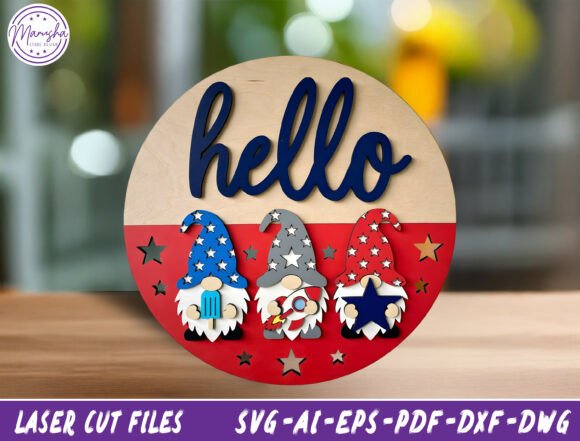
Adding a personal, festive touch to your home entrance is one of the most effective ways to welcome guests and celebrate seasonal holidays. The Patriotic Gnome Door Sign Laser Cut File has become a popular choice for crafters and homeowners looking to create charming Independence Day or Memorial Day décor. This design features three adorable gnomes dressed in red, white, and blue, accented with star details and a bold “hello” script. While the concept is simple and visually appealing, successfully bringing this digital file to life requires more than just hitting the “cut” button. Understanding the nuances of layering, material selection, and machine compatibility can mean the difference between a professional-looking piece and a frustrating project.
Understanding the Design Structure
Before diving into the cutting process, it is essential to understand what you are actually purchasing. When you download a layered SVG or DXF file for this gnome sign, you are not receiving a single solid image. You are receiving a complex assembly of vector paths that must be arranged correctly to achieve depth and dimension. The design typically includes separate layers for the background circle, the individual gnome bodies, their hats, facial features, and the text elements.
A common misunderstanding among beginners is assuming that all parts of the design should be cut from the same sheet of material at the same time. In reality, achieving the best visual impact often involves using different materials for different layers. For instance, cutting the gnome bodies from a vibrant red felt while cutting the background from natural burlap creates a striking contrast that flat, single-material signs lack. However, this approach requires careful planning regarding alignment and adhesive placement.
Material Selection: Avoiding Common Pitfalls
The success of your Patriotic Gnome Door Sign Laser Cut File largely depends on the substrate you choose. Many users make the mistake of selecting materials that are too thick or too thin for their specific machine settings. If you are using a CO2 laser like a Glowforge or xTool, wood plywood (such as 3mm basswood) is a standard choice. However, if you opt for acrylic, you must ensure it is cast acrylic rather than extruded, as extruded acrylic can yellow or crack under high heat.
Another frequent error involves ignoring the grain direction when cutting wood. Cutting against the grain can result in uneven edges or charring that detracts from the clean lines of the gnome designs. Always inspect your material before loading it into your CNC router or laser cutter. Additionally, if you plan to use fabric or felt, remember that these materials do not hold up well outdoors without sealing. A patriotic sign meant for a front door will fade quickly if exposed to direct sunlight without UV-resistant spray or varnish.
Machine Compatibility and File Formats
This digital download is versatile, supporting formats such as SVG, AI, EPS, PDF, DXF, and DWG. While this variety is convenient, it also introduces potential technical hurdles. Not all software handles every format equally well. For example, if you are using a Cricut Maker, an SVG file is ideal because it retains color information and layer hierarchy directly within the software. However, if you are sending the file to a commercial CNC router via LightBurn or RDWorks, a DXF or AI file might provide better precision for vector cutting.
Users often overlook the importance of checking the scale of the design after importing it. A file that looks perfect in preview mode might end up being significantly smaller or larger than intended once imported into cutting software. Always set your document size to inches or millimeters immediately upon opening the file to ensure accuracy. Furthermore, verify that the layers are named logically. Disorganized layers can lead to accidental cutting errors, where you might inadvertently cut out a delicate star detail instead of the main gnome body.
Assembly and Alignment Challenges
Once the pieces are cut, the assembly phase presents its own set of challenges. Layered designs require precise alignment to maintain the integrity of the image. Misalignment can cause the gnomes’ faces to appear skewed or the text to look disjointed. To avoid this, consider using registration marks or a light table to align your layers before adhering them. If you are working with wood, pre-drilling small holes for alignment pins can save significant frustration during gluing.
Adhesive choice is another critical factor. Standard hot glue may melt thin plastic components or leave visible strings that ruin the aesthetic. For wood and fabric combinations, a strong tacky glue or a specialized craft adhesive works best. If you are engraving details onto wood, ensure your laser power and speed settings are calibrated correctly. Too much power can burn through thin sections, while too little results in faint, hard-to-see engravings.
Preparing for Outdoor Durability
If your goal is to display this Patriotic Gnome Door Sign Laser Cut File on a porch or exterior wall, durability is paramount. Indoor-only materials will deteriorate rapidly when exposed to moisture and temperature fluctuations. Seal wooden signs with a clear polyurethane or outdoor-rated varnish to protect against rain and humidity. For fabric-based signs, consider laminating them or using weather-resistant vinyl overlays. Remember that even indoor signs benefit from protection if they are placed near windows where sun exposure is high.
Evaluating Value and Usage Opportunities
When considering the purchase of this digital asset, think beyond personal use. The versatility of the Patriotic Gnome Door Sign Laser Cut File makes it an excellent candidate for small business ventures. Craft fairs around July 4th and Memorial Day see a surge in demand for handmade home décor. By producing high-quality, layered signs, you can offer premium products that stand out from mass-produced alternatives.
However, always respect intellectual property rights. Ensure that the license associated with the digital download allows for commercial use if you intend to sell the finished products. Some creators restrict sales to a certain number of units or require attribution. Failing to check these terms can lead to legal issues and damage your reputation as a maker.
Final Considerations for Success
To get the most out of your Patriotic Gnome Door Sign Laser Cut File, take the time to experiment with small test cuts before committing to expensive materials. Adjust your machine settings based on the specific thickness and type of material you are using. Pay close attention to the layer order in your design software, ensuring that background elements are cut before foreground details if you are stacking multiple sheets.
By avoiding common mistakes related to material selection, alignment, and finishing, you can create stunning patriotic décor that enhances your home’s curb appeal. Whether you are a seasoned pro or just starting with laser cutting, this design offers a rewarding project that combines creativity with technical skill. With proper preparation and attention to detail, your “Hello” gnome sign will be a cherished addition to your seasonal celebrations for years to come.