Easter Bunny Welcome Sign Laser Cut File
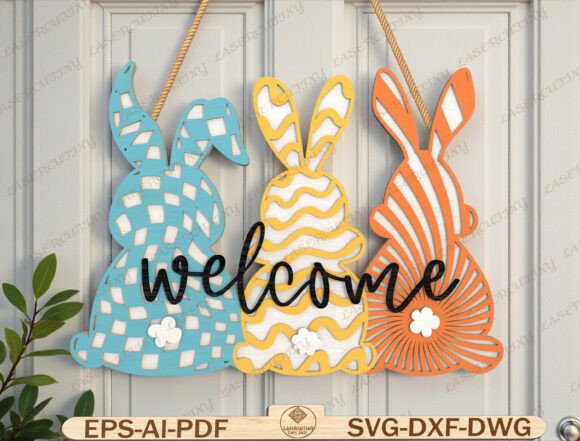
Create a bright and cheerful spring entrance with this layered Easter Bunny Welcome design. Featuring three modern pastel bunnies with decorative cut patterns and bold “welcome” script, this design makes a perfect Easter door hanger or seasonal wall décor. The multi-layer structure creates a beautiful 3D depth effect when cut from wood, MDF, or acrylic and assembled together. Perfect for spring home décor, Easter porch decoration, or handmade seasonal gifts. You can customize colors to match your style or farmhouse theme.
What Is This Digital Design?
This Easter Bunny Welcome Sign Laser Cut File is a digital asset designed specifically for crafting enthusiasts who use laser cutters, CNC machines, or electronic cutting plotters. Unlike physical products that are shipped to your doorstep, this is a DIGITAL DOWNLOAD. Once you purchase the file, you receive immediate access to download the necessary files directly to your computer or mobile device. This means you can start creating your unique spring decorations almost instantly, without waiting for shipping times or dealing with packaging waste.
The core of this design lies in its layered composition. It is not just a flat image; it is a technical blueprint for a three-dimensional object. The file includes separate layers for each bunny and the welcome text, allowing you to stack them at varying depths. When these layers are aligned and secured, they create a stunning visual depth effect that catches the light and draws the eye. This technique transforms simple materials like plywood or acrylic into intricate art pieces that look professionally made.
Why Choose a Layered Easter Design?
There is a significant difference between a single-layer cutout and a multi-layered design. A single layer is straightforward but often lacks visual impact. In contrast, the layered approach used in this Easter Bunny Welcome Sign Laser Cut File adds dimension and sophistication. Here is why this specific style appeals to both beginners and experienced crafters:
- Visual Depth: By offsetting the layers, you create shadows and highlights that make the design pop off the wall or door. This 3D effect is particularly effective with the "welcome" script, which stands out prominently against the background bunnies.
- Creative Flexibility: Because the elements are separated in the digital file, you have full control over the color palette. You can choose traditional pastel pinks and blues, or you might opt for vibrant neon colors for a modern twist. For those who prefer a rustic aesthetic, natural wood tones with white accents work beautifully for farmhouse-style homes.
- Professional Finish: The intricate decorative cut patterns on the bunnies add texture and detail that would be difficult to achieve by hand. These delicate shapes demonstrate high-quality craftsmanship, making your finished piece suitable for display in a retail setting or as a premium gift.
Who Can Use This File?
This digital product is versatile enough to serve a wide range of users, from hobbyists looking for a fun weekend project to small business owners aiming to expand their inventory. The compatibility list ensures that most common crafting equipment can handle the design.
For Home Decorators and Hobbyists
If you enjoy personalizing your living space, this design offers an easy way to celebrate the season. Spring is a time for renewal, and a welcoming sign sets a warm tone for guests visiting your home. You can hang it on your front door to greet visitors during Easter brunches or place it on a mantelpiece as part of a larger seasonal display. The ability to customize colors allows you to match existing decor themes, whether you lean towards modern minimalism or cozy farmhouse charm.
For Small Business Owners and Craft Fair Vendors
Seasonal items are often best-sellers at craft fairs and online marketplaces like Etsy. An Easter Bunny Welcome Sign Laser Cut File provides a reliable product that can be produced repeatedly with consistent quality. Since the design is pre-made, you save hours of vector tracing and design time. You can focus on sourcing materials, assembling the pieces, and marketing your products. Many sellers find that layered signs command a higher price point due to the perceived value of the 3D effect and the labor involved in assembly.
For Educators and Group Projects
Schools and community centers often look for engaging activities during the spring semester. This file can be used in woodworking classes, maker spaces, or art workshops. Students can learn about layering techniques, material properties, and design alignment while creating a tangible, festive result. The clear instructions inherent in well-structured SVG or DXF files make it easier for instructors to guide students through the process.
Technical Compatibility and Formats
One of the strongest advantages of this digital download is its broad compatibility. Whether you operate a high-end industrial machine or a desktop hobbyist cutter, there is likely a format included that works for you. The package contains multiple file types to ensure seamless integration with your software:
- SVG: Ideal for Cricut Maker, Silhouette Designer Edition, and other vinyl cutters. It is also widely supported by laser software for vector cutting.
- DXF: A standard format for CAD programs and many laser cutting machines, ensuring precise scaling and positioning.
- PDF: Useful for viewing the design layout or for manual tracing if needed. Some laser systems can import PDFs directly.
- AI and EPS: Preferred formats for professional graphic designers using Adobe Illustrator or CorelDRAW, allowing for further editing before export.
- DWG: Compatible with AutoCAD and other engineering-focused software.
This variety supports machines such as Glowforge, xTool, OmTech, and LightBurn setups. If you are unsure about your specific machine’s capabilities, checking the manufacturer’s recommended file formats is always a good first step. However, the inclusion of universal formats like SVG and DXF covers the vast majority of current consumer and prosumer devices.
Considerations Before You Start
While the digital file itself is ready to use, successful production requires some planning. First, consider your material choice. Wood and MDF provide a warm, natural look that pairs well with the pastel bunny theme. Acrylic offers a sleek, modern appearance with vibrant color options. Keep in mind that different materials may require different laser settings or blade depths, so testing on scrap pieces is recommended.
Secondly, think about assembly. The beauty of this design relies on the alignment of the layers. Using spacers, glue dots, or small brackets can help maintain consistent spacing between the bunnies and the text. Taking your time during the assembly phase will result in a much more polished final product.
Finally, remember that this is a digital product. No physical sign will be shipped to you. Ensure you have the necessary equipment and materials to bring the design to life. With the right tools and a bit of creativity, this Easter Bunny Welcome Sign Laser Cut File can become the centerpiece of your spring celebrations, offering a joyful welcome to friends and family alike.